konab.com
- Kent
- Articles
- FIM 2010 R2 Book
- The Story in this book
- Overview of FIM 2010 R2
- Installation
- Basic Configuration
- User Management
- Group Management
- Self-Service Password Reset
- Using FIM to manage Office365 and other Cloud Identities
- Reporting
- FIM Portal Customization
- Customizing Data transformations
- Issuing Smart Cards
- Troubleshooting
- Training
Archive for category UAG
Microsoft Forefront UAG Mobile Configuration Starter
Are you planning to allow mobile devices in your company and realize you need a secure way of publishing the resources that the clients will access?
Well then I suggest you take a look at the Microsoft Forefront Mobile Configuration Starter book written by Fabrizio Volpe. In this book Fabrizio gives you an easy to follow guideline to get you started with using UAG as your mobile access solution. He also gives you many pointers to resources where you can dig deeper into the mystery of allowing mobile devices access to your internal resources.
I also recommend you take a look at my earlier post on how to use KCD to secure your infrastructure where i discuss how KCD can be used to secure mobile device access.
Server 2012 Unified Remote Access Book
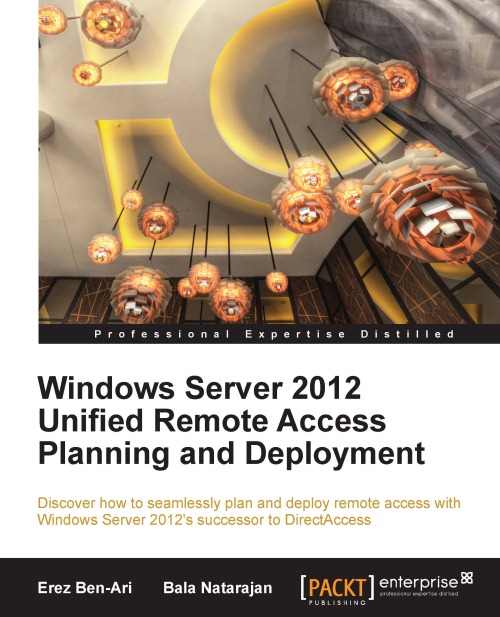
Erez Ben Ari and Bala Natarajan have written a new book about Unified Remote Access in Windows Server 2012. This explains how Direct Access in Server 2008 R2, combined with Forefront UAG, might be replaced by Unified Remote Access in Windows Server 2012.
You can get the book from Packt Publishing.
Microsoft announcing UAG 2010 SP3
Microsoft have just announced that UAG 2010 SP3 will come in Q1 2013.
The SP3 will add support for:
- Windows 8 with Internet Explorer 10 clients
- Office 2013 clients (e.g. Outlook, Word, Excel, PowerPoint)
- Publishing Exchange 2013
- Publishing SharePoint 2013
- RDP 8.0 client for Windows 7 SP1
Does UAG activation disconnect users?
A common question for all UAG administrators is if activating the configuration will affect users currently using the UAG.
Erez Ben-Ari (co-author of the books Microsoft Forefront UAG 2010 Administrator’s Handbook and Mastering Microsoft Forefront UAG 2010 Customization) have given a very clear answer to that question.
Normally, it does not. The exceptions are:
- SSL-VPN tunnels do get severed during an activation, so anyone using those will be disconnected and need to re-launch the tunnel.
- Occasionally, UAG might detect that IIS is not responding, and issue an IISRESET. That would effectively terminate all sessions. It’s pretty rare to happen, though.
- The labor involved with the process can make the servers less responsive to some degree. Usually, it’s barely noticeable, though.
Bottom line is that activating a new configuration should in normal case not affect the users running applications published in UAG.
Checking account status when using Smart Card against UAG
If you enable Smart Card authentication in UAG you might run into a problem where UAG allows users access even though the Active Directory account is disabled. In this post I will show you how I solved that problem at a customer.
If you follow the TechNet guide to Configuring SSL client certificate authentication you will find that UAG will allow access to a user even if the account is disabled or locked in Active Driectory. As long as the certificate is ok and mappes to a user in AD it will allow access. At a customer of mine this was not the wanted scenario and they did not want to revoce the certificates either since certificates (Smart Cards) where distributed to vendors and other non-employees. They wanted to be able to disable the AD account and thereby denying access to the UAG portal.
The Solution
In the guide (step 7) you will find that you will make a copy of the repository_for_cert.inc template and rename it to the Authentication_Server_Name.inc. In that file the first function is called CheckCredentials looking like this.
function CheckCredentials(user_name,password)
if user_name = "" then
CheckCredentials = false
SendFailToAuthenticateMsg "Did not get user name"
else
CheckCredentials = true
end if
end function
What I did was to add a new function call to this function getting something like this.
function CheckCredentials(user_name,password)
if user_name = "" then
CheckCredentials = false
SendFailToAuthenticateMsg "Did not get user name"
else
Accountlock = CheckAccountlock(user_name)
if Accountlock = true then
CheckCredentials = false
SendFailToAuthenticateMsg "Account disabled in AD"
else
CheckCredentials = true
end if
end if
end function
The SendFailToAuthenticateMsg “Account disabled in AD” will show in the logs of UAG and will tell you why the authentication failed.
The new function CheckAccountLock gave me a problem. UAG does not run this as an account with access to AD. So I ended up creating a read-only service account I could tell my function to use to check the user account in AD. The final function looked something like this.
function CheckAccountlock(user_name)
Const ADS_UF_ACCOUNTDISABLE = &H0002
'create connection
set connAD = CreateObject("ADODB.Connection")
connAD.Provider = "ADsDSOObject"
connAD.Properties("User ID") = "AD\UAG_ReadAD"
connAD.Properties("Password") = "SomePassword"
connAD.Properties("Encrypt Password") = true
connAD.Open
'Search user
strBase = "<LDAP://DC=ad,DC=company,DC=com>"
strFilter = "(sAMAccountName=" & user_name & ")"
strAttributes = "sAMAccountName,userAccountControl"
strScope = "subtree"
strFullCommand = strBase & ";" & strFilter & ";" & strAttributes & ";" & strScope
set rsADUserInfo = CreateObject("ADODB.Recordset")
set rsADUserInfo = connAD.Execute(strFullCommand)
if not rsADUserInfo.EOF then
uac = rsADUserInfo("userAccountControl")
end if
if uac AND ADS_UF_ACCOUNTDISABLE Then
CheckAccountlock = true
Else
CheckAccountlock = false
end if
'Close
set rsADUserInfo = Nothing
connAD.Close
set connAD = Nothing
end function
I do think that there are more elegant ways of solving this problem. But time in this case was short and I was happy to have solved the customers problem. Feel free to comment if you have some ideas on how to improve this solution.
UAG Security Bulletin MS12-026
Today Microsoft released a Security Bulletin for UAG, this Bulletin is rated Important. As with all other UAG updates, these packages are not pushed out via Windows Update/Microsoft Update or any of the other automated patching mechanisms, this is because of the special order that needs to be followed for array deployments (array manager first and then rest of the nodes). Following are the relevant links:
- MS12-026: http://technet.microsoft.com/en-us/security/bulletin/MS12-026
- Master KB 2663860: http://support.microsoft.com/kb/2663860
- KB 2649261 for UAG SP1: http://support.microsoft.com/kb/2649261
- KB 2649262 for UAG SP1 Update 1: http://support.microsoft.com/kb/2649262