konab.com
- Kent
- Articles
- FIM 2010 R2 Book
- The Story in this book
- Overview of FIM 2010 R2
- Installation
- Basic Configuration
- User Management
- Group Management
- Self-Service Password Reset
- Using FIM to manage Office365 and other Cloud Identities
- Reporting
- FIM Portal Customization
- Customizing Data transformations
- Issuing Smart Cards
- Troubleshooting
- Training
Archive for category TMG
TMG available as SecureGuard appliance after Dec 1
In this Announcement Availability of Microsoft Forefront TMG 2010 on SecureGUARD Appliance Series from SecureGuard we can read that. “As announced by the Microsoft Server & Cloud Blog, Microsoft Forefront TMG 2010 will be discontinued and will be no longer available for purchase as of Dec. 1, 2012. Nevertheless SecureGUARD Appliances with TMG 2010 licenses will be available for purchase significantly longer than Dec. 1, 2012.”
My supplier tells me that SecureGuard at the moment plans to support their TMG appliances until 2023.
Read about all SecureGuard appliances and offerings on http://www.secureguard.de
Interested in buying SecureGuard appliances? Contact me at kent@xpservices.se or just comment on this post.
Thanks to ISA and TMG teams
Posted by Kent in ISA, Personal Thoughts, TMG on September 12, 2012
I just want to take this opportunity to say thanks to everyone that over the years have worked with ISA and TMG. Having myself worked with ISA and TMG since beta of ISA 2000 I can only say… You all did a fantastic job, making ISA and TMG one the best firewalls on the market. Thank you!
Installing TMG SP2 on UAG
I get a lot of questions from my customers if they should install TMG SP2 on their UAG server. The short answer is Yes. The longer answer is…
The answer from Microsoft when asking about TMG SP2 support on UAG was… “Tested and fully supported coexistence of UAG SP1 and UAG SP1 UP1 with TMG SP2“. So you have to have UAG SP1 or higher before you install TMG SP2.
But what about the new Update1 to UAG SP1? Well if you plan to add both TMG SP2 and UAG SP1 Update1 to your UAG, the recommended install order is to first install the TMG SP2 and then Update 1 for UAG SP1.
Slipstreaming TMG SP2
If you would like to make a slipstreamed media of TMG including SP2 you need to first make sure it’s SP1 Update 1. Let me give you a quick guide on how to do this.
Get hold of your TMG DVD, remember that there are two versions Standard or Enterprise Edition.
Extract the content of the DVD to a folder (in my example D:\TMG)
We need to download
- TMG SP1 ( KB981324) – (in my example to D:\SP1)
- TMG SP1 Update 1 (KB2288910) – (in my example to D:\Update1)
- TMG SP2 (KB2555840) – (in my example to D:\SP2)
Update 1 and SP2 is not in .msp format but in .exe so first you need to extract the msp using
- “TMG-KB2288910-amd64-ENU.exe /t D:\Update1″
- “TMG-KB2555840-amd64-ENU.exe /t D:\SP2″
Now we can start producing our slipstreamed DVD.
- Open a command prompt and navigate to D:\TMG\FPC.
- Add SP1 using
“msiexec /a MS_FPC_Server.msi /p D:\SP1\TMG-KB981324-AMD64-ENU.msp” - Add Update 1 using
“msiexec /a MS_FPC_Server.msi /p D:\Update1\TMG-KB2288910-amd64-ENU.msp” - Add SP2 using
“msiexec /a MS_FPC_Server.msi /p D:\SP2\TMG-KB2555840-amd64-ENU.msp” - Use your favorite ISO tool and make a DVD from the content of D:\TMG
You now have a slipstreamed media of TMG that installs directly with version 7.0.9193.500.
What will happen with TMG?
Posted by Kent in Personal Thoughts, TMG, UAG on May 28, 2011
What is the plan for TMG in the future? Will it vanish or will it just be a part of the next generation where TMG and UAG become one “Unified Gateway”?
Why suddenly ask these questions you might wonder, well…
The last Gartner report, published 25 May 2011, on Secure Web Gateways presents the following Maqic Quadrant for Secure Web Gateways.
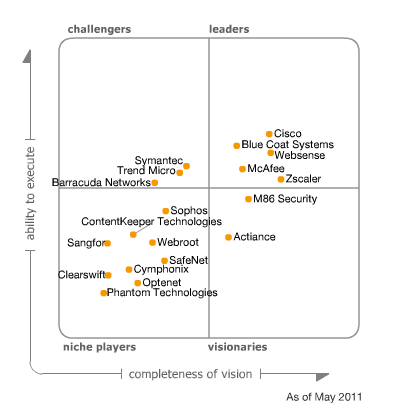
As you can see it does not list TMG and the report contains the following text:
“Microsoft has informed Gartner that it does not plan to ship another full version release of its SWG product, the Forefront Threat Management Gateway (TMG). The product is effectively in sustaining mode, with Microsoft continuing to ship Service Pack (SP) updates; the next one, SP2, is planned for 3Q11. Microsoft will also continue to support TMG for the standard support life cycle — five years of mainstream support and five years of extended support. In the SWG category, TMG will become less competitive over time, since Microsoft’s goal is not to compete head-to-head with other vendors in that space. We believe that Microsoft will repurpose TMG technologies in other products and services as part of its overall cloud strategy.”
I have spent the last few days trying to get some “official” comments on this from Microsoft but has so far failed. So we can only speculate what this means.
My speculation around this is that this is part of the cloud strategy as mentioned in the Gartner report and UAG is the gateway product prepared for the cloud. My guess and speculation is that this is not the end of TMG as function but maybe as standalone product. I think we will see TMG and UAG merge into one “Unified Gateway”.
[Update 2011-05-31]
During the last 48 hours I have recieved information leading me to believe my guess and speculation above is not entirely correct. The “truth” is not yet revealed but hopefully Microsoft realize that customers and partners are waiting for clarification on the product roadmap of TMG and UAG.
[End of Update]
As soon as any official statement is presented I will add that to this post.
[Update 2012-09-17]
Important changes to Forefront product roadmaps
[End of Update]
Use KCD to secure your infrastructure
In todays world, working remotely, and accessing information from outside the corporate network, is a demand. One huge problem with many solutions today is that this will make us expose our domain password on un-secure clients like mobile phones and internet café’s. On these un-secure devices it is very hard for us to know if there is some kind of password snatcher, and if the password is stolen this can often be used to logon to our corporate resources.
KCD (Kerberos Constrained Delegation) makes it possible for us to build solutions that do not require the domain password to access resources like ActiveSync, OWA and Sharepoint. Microsoft ForeFront UAG and TMG are two great products that can make use of KCD to secure your infrastructure.
How to make it work…
What you do is that you configure TMG/UAG to authenticate using a method that do not require the users domain password. This could be an OTP (One Time Password) for example. You then configure delegation to use KCD and UAG/TMG will request a Kerberos ticket on behalf of the user and present that as credentials to the service. In many scenarios you will find that UAG´s more flexible authentication options will make this much easier using UAG then TMG.
The ActiveSync example…
ActiveSync is widely used to access email based on Microsoft Exchange. Usually this means the username and password of the domain account is stored in the device. A mobile phone, no matter how “smart”, is not a secure platform. What you can do is to configure a second identity store where the username and “activesync password” is stored. You then use UAG/TMG to authenticate against that store and then use KCD to get the users data from Exchange. This way the password stored in the device is not the same as the domain password and you can also enforce a different password complexity and change policy.
Prerequisites…
First of all we need to understand that in order for KCD to work there are some demands on the infrastructure.
- The UAG/TMG server must be a member of the same domain as the resource the user tries to access.
- UAG/TMG needs to be trusted for delegation for the specific service
- The username needs to be the same if using multiple identity stores.
- The resource needs to accept Kerberos authentication.
More to come…
I am currently working on a more detailed article to show how to configure the ActiveSync example using UAG and AD LDS as the ActiveSync user store. I might even throw in a section on how FIM (ForeFront Identity Manager) can be used to automate the process of managing the second identity store required in this example.

